Computer Graphics
Scalable Vector Graphics (SVG)
SVG Shapes
XML elements for basic SVG shapes have a single tag that acts as both the opening and closing tag, with a slash before the closing angle bracket indicating there is only one tag.
For example, notice the slash before the closing angle bracket of the following circle element:
<circle cx="50" cy="50" r="40" />
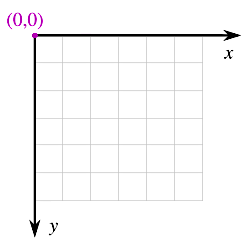
SVG coordinates are left-to-right for the x axis, and top-down for the y axis:
Following are some of the SVG basic shapes. Additional shapes will be covered later.
Rectangle
A rectangle is drawn with the <rect> element:
<svg width="100" height="50"
    xmlns="http://www.w3.org/2000/svg">

    <!-- Draw a rectangle -->

    <rect x="10" y="5" width="80" height="40"
        stroke="black" fill="Aquamarine" />

</svg>
Notice the comment
(“Draw a rectangle”)
in this example.
XML comments begin with
The width and height attributes specify the size of the rectangle.
The x and y attributes specify the x and y distances from the drawing canvas origin (upper-left) to the upper-left corner of the rectangle.
To draw rounded corners on a rectangle, specify the horizontal and vertical radius for each corner, using the rx and ry attributes respectively:
<svg width="100" height="50"
    xmlns="http://www.w3.org/2000/svg">

    <!-- Draw a rounded rectangle -->

    <rect x="10" y="5" width="80" height="40"
        rx="5" ry="5"
        stroke="black" fill="Aquamarine" />

</svg>
Circle
A circle is drawn with the <circle> element:
<svg width="100" height="60"
    xmlns="http://www.w3.org/2000/svg">

    <!-- Draw a circle -->

    <rect cx="50" cy="30" r="25"
        stroke="black" fill="Seashell" />

</svg>
The cx and cy attributes specify the x and y distances from the drawing canvas origin (upper-left) to the center of the rectangle. The r attribute specifies the radius of the circle.
Ellipse
An ellipse is drawn with the <ellipse> element:
<svg width="100" height="60"
    xmlns="http://www.w3.org/2000/svg">

    <!-- Draw an ellipse -->

    <rect cx="50" cy="30"
        rx="40" ry="25"
        stroke="black" fill="Coral" />

</svg>
The cx and cy attributes specify the x and y distances from the drawing canvas origin (upper-left) to the center of the ellipse. The rx and ry attributes specify the horizontal and vertical radius of the ellipse.
CSS Colors
The preceding examples used X11 color names. Say you want to define your own color names. That can be done with the <style> element:
<svg width="200" height="50"
    xmlns="http://www.w3.org/2000/svg">

    <style>
        .myBlue { fill:LightBlue }
        .LightTan { fill:#FFE4B5 }
    </style>

    <rect x="10" y="5" width="80" height="40"
        rx="5" ry="5"
        class="LightTan" />

    <rect x="110" y="5" width="80" height="40"
        rx="5" ry="5"
        class="myBlue" />

</svg>
The rect element attribute becomes class instead of fill.
In this example, custom color names are declared as class names in the <style> element. Note that class name declarations are preceded with a period, so that myBlue is declared as .myBlue, etc. The leading period tells CSS that a class is being declared. The class name does not use the leading period after the class is declared.
Scalable Vector Graphics (SVG)
SVG Element
Basic Shapes (this page)
Linear Gradient
Radial Gradient
Compositing
Lines
Curves