Computer Graphics
Scalable Vector Graphics (SVG)
Curves
SVG is able to draw curves using the De Casteljau / Bezier algorithm. This is done using the C command (CurveTo) in the d attribute of the SVG <path> element.
This type of curve is defined using four points: two endpoints of the curve; and a point relative to each endpoint that specifies the direction and elongation of the curve at that endpoint.
Each of those latter two points (that specify the direction and elongation of the curve at an end point) is called a control point of its respective endpoint.
Only three points are specified, because the first point is the last point that was used in the previous drawing command (use the MoveTo command to position the first point if there was no previous drawing command, or to use a different point other than the last point of the previous command).
We start with an example of a curve that has endpoints horizontally offset from each other (at the same vertical height), with center of the curve bulging straight upwards (having left-right symmetry):
<svg width="170" height="95"
    xmlns="http://www.w3.org/2000/svg">

    <path
        d="M 10 85  C 10 -15  160 -15  160 85"
        stroke="Green" fill="none" />

</svg>
The control points are off of the drawing area,
at −15 height
We chose this height of the control points to try to make this curve approximate a half circle. To see how close it approximates a circle, make the curve thicker and draw a red circle over it:
<svg width="170" height="95"
    xmlns="http://www.w3.org/2000/svg">

    <path
        d="M 10 85  C 10 -15  160 -15  160 85"
        stroke="LimeGreen" fill="none"
        stroke-width="10" />

    <circle cx="85" cy="85" r="75" stroke="Red" fill="none" />

</svg>
Because of how we defined the control points (explained below), the curve coincides with a circle only at the endpoints, and halfway along the curve (top). The rest of the curve does not coincide exactly with a circle, but rather is only an approximation constructed for computational efficiency.
To visualize the control points, we will make the drawing area larger, so that the control points are within the drawing area. This is only to display the control points. Normally the control points are not displayed and therefore do not need to be within the drawing area.
The following example makes the drawing area larger, and displays each control point with a line segment connecting the control point to its respective curve endpoint.
<svg width="170" height="120" fill="Black"
    xmlns="http://www.w3.org/2000/svg">

    <path
        d="M 10 110  C 10 10  160 10  160 110"
        stroke="LimeGreen" fill="none" />

    <path
        d="M 10 110  L 10 10  M 160 10  L 160 110"
        stroke="DarkGray" fill="none" />

    <circle cx="10" cy="110" r="4" />
    <circle cx="10" cy="10" r="4" />

    <circle cx="160" cy="10" r="4" />
    <circle cx="160" cy="110" r="4" />
</svg>
The drawing area is now taller, showing line segments connecting each control point to its curve endpoint, and large dots (small filled circles) displaying the four points.
The first <path> element draws the curve as before, but lower down in the taller drawing area. The second <path> element draws the line segments that connect each control point to its endpoint.
Four <circle> elements draw the points using the default fill (Black) that is specified in the fill attribute of the <svg> element opening tag.
Locus Edges
The sequential layout of the points of this example is orthogonal, forming the upper three sides of a rectangle:
Take the midpoint of each of the three sides, and draw blue line segments to connect neighboring midpoints:
Then draw a red line connecting the midpoints of the blue lines. The midpoint of the red line is on the curve, in this case at the top of the curve:
This is why the control points in this example are 4/3 higher than the curve. The left and right (blue) midpoints are halfway up (2/4 way up). The red midpoints are quarter-way (1/4) up from there (adding 1/4 to 2/4, totalling 3/4). That makes the top of the curve three-fourths (3/4) way up to the height of the control points, which makes the control points 4/3 higher than the top of the curve.
All of the points on the curve (locus) can be drawn this way: besides midpoints, one-third way across also generates a point on the curve, one-fourth way across does too, etc.
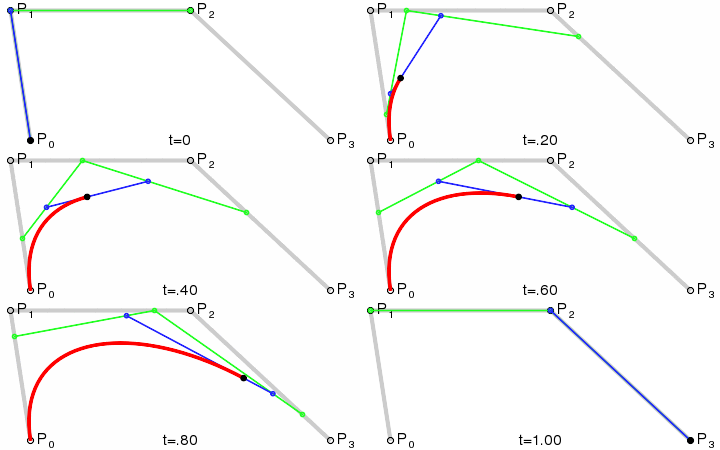
Animation courtesy of Phil Tregoning
Curve points can also be calculated recursively, using midpoints of the midpoint line segments. That generates control points for portions of the curve. See Justin Solomon, Introduction to Computer Graphics, Lecture 2: Cubic Curves.
Scalable Vector Graphics (SVG)
SVG Element
Basic Shapes
Linear Gradient
Radial Gradient
Compositing
Lines
Curves (this page)